Socket Rules
Socket Rules are the core of the placement generation. They define which pieces can be spawned at specific locations on a building piece.
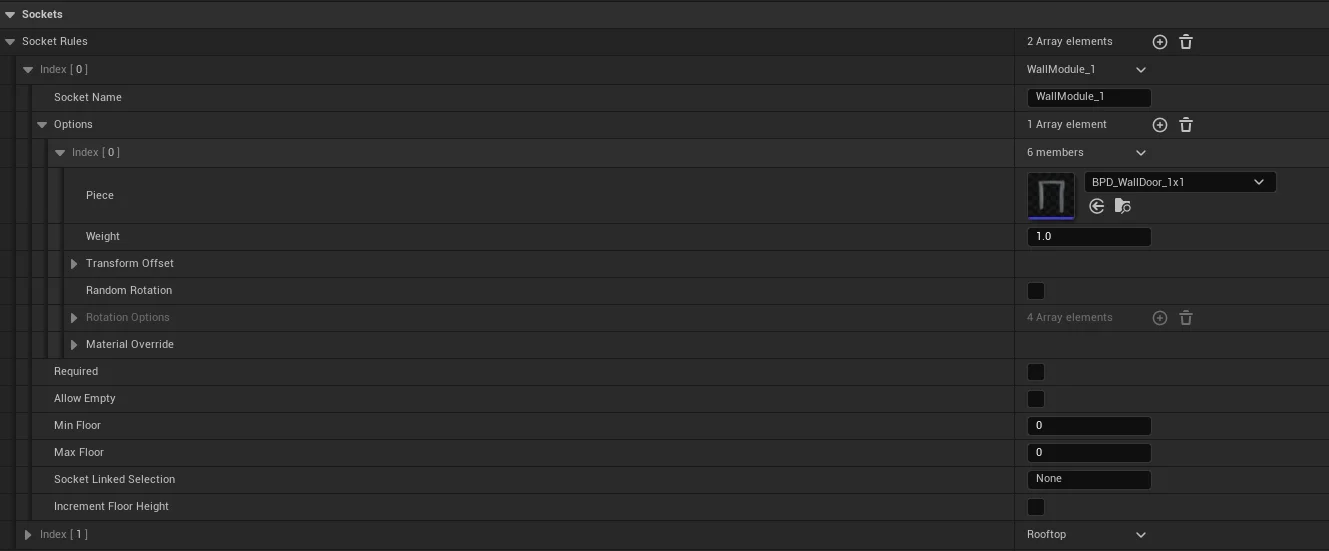
How it Works
When the generator spawns a building piece, it looks at the sockets on that piece's static mesh. It then checks the Socket Rules defined in the Building Piece Definition.
If a rule's Socket Name matches a socket on the mesh, the generator will attempt to spawn one of the Piece Options provided in that rule.
Adding Sockets to Static Meshes
For the Building Generator to know where to place pieces, you must add sockets to your Static Meshes in Unreal Engine:
- Open your Static Mesh asset in the Static Mesh Editor.
- In the Socket Manager panel (Window > Socket Manager if not visible), click Add Socket.
- Name the socket (e.g.,
Wall_Top,Corner_Left). - Move and rotate the socket to the desired connection point.
- Tip: The orientation of the socket (especially the Forward/Up axes) will determine how the next piece is rotated.
- Save the mesh.
Currently, the system primarily supports sockets on Static Meshes. While you can spawn Blueprints as building pieces, the generator cannot currently look for sockets within a Blueprint piece to continue generation from it. Full socket support for Blueprint-based pieces is planned for a future update.
Rule Properties
| Property | Description |
|---|---|
| Socket Name | The name of the socket on the static mesh this rule applies to. |
| Options | A list of Building Piece Options. |
| Required | If true, the generator must successfully spawn a piece here. (e.g. throws an error if no mesh can be spawned) |
| Allow Empty | If true, there is a chance no piece will be spawned (even if required is false). |
| Min/Max Floor | Constraints for which floors this rule applies to. |
| Increment Floor Height | If true, pieces spawned here will increase the current floor count for sub-pieces. This MUST be ticked for each level foundation above the first one. |