Building Generator Actor
The BuildingGenerator Actor is the core component of the plugin and your primary interface for generating buildings within the Unreal Engine level editor.
Location
You can find the BuildingGenerator actor in the Place Actors panel. Simply search for "Building Generator" and drag it into your level.

Overview
Once placed in the world, this actor uses a Building Definition to recursively place building pieces based on the rules you've defined. It handles the spawning of components, application of materials, and provides tools for finalising your creations.
Key Actions
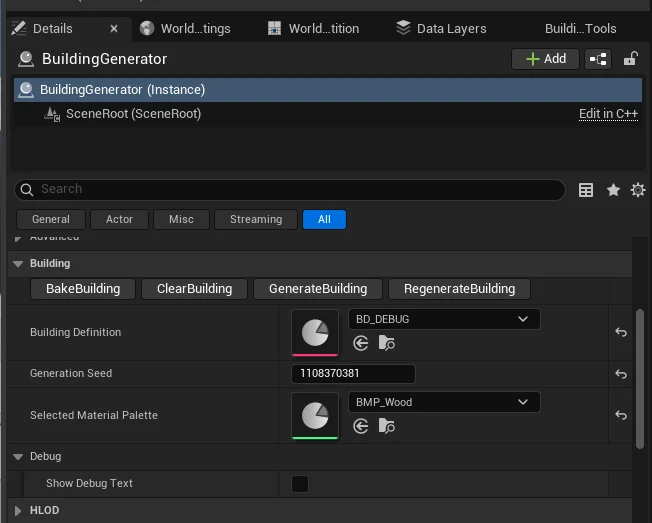
In the Details panel of the Building Generator Actor, you will find several utility buttons:
- Generate Building: Starts a fresh generation process. This will randomize the result based on the weights in your rules.
- Regenerate Building: Re-runs the generation using the current seed. This is useful if you want to see the exact same building again (for example, after changing a material palette or tweaking a rule).
- Clear Building: Removes all generated components and actors, resetting the generator to an empty state.
- Bake Building: Converts the generated result into permanent assets.
The Baking Process
Baking is the process of turning your dynamic, generated building into a static, optimized asset that can be used in your game without the overhead of the generator.
When you click Bake Building, the system:
- Creates a new Blueprint: A standalone Blueprint actor is generated containing all the pieces of your building.
- Adds Actors and Components: The system includes any actors (like props or lights) and components defined in your piece definitions directly into the generated Blueprint.
- Generates Static Meshes: The system creates new static mesh assets by merging the generated pieces (typically separating them into opaque and transparent/glass meshes for better performance and rendering).
- Spawns in World: The newly created Blueprint actor is automatically spawned into your level at the same location as the generator.
- Saves Assets: All newly created assets are saved to your project's content folder.
Seeding and Reproducibility
The Generation Seed value is what drives the randomness of the building.
- If you find a building layout you really like, you can copy the
Generation Seedvalue. - By pasting this seed into another Building Generator actor (with the same Building Definition), you can perfectly replicate that specific building.
- Generate will pick a random new seed, while Regenerate stays on the current one.
Debugging
- Show Debug Text: When enabled, the generator will display information (like piece names and socket connections) in the world.
- This requires your building pieces to have a
DebugTextsocket defined. See the Building Piece Definition page for more details.